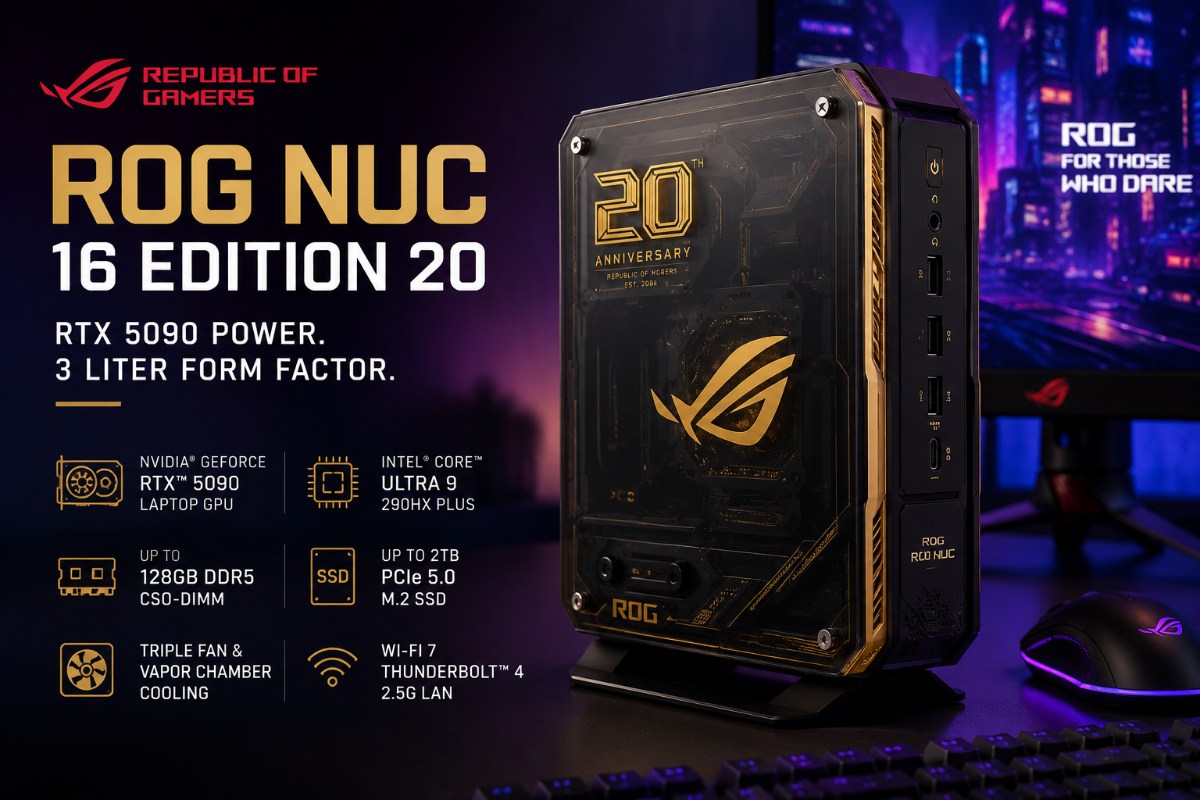
ASUS is pushing the mini PC category into luxury territory with flagship mobile silicon, 24 GB graphics memory, upgradeable memory and storage, and a price that narrows the audience fast.
ASUS has managed to put an Nvidia GeForce RTX 5090 Laptop GPU and an Intel Core Ultra 9 processor into a desktop that holds just 3 liters of hardware. The ROG NUC 16 Edition 20 also supports up to 128 GB of DDR5 memory, a 2 TB PCIe SSD setup, and a transparent anniversary chassis with gold accents. On paper, it looks less like a living room PC and more like a compressed enthusiast machine.
The GPU brings 24 GB of GDDR7 VRAM, which matters for high resolution gaming, creative workloads, and memory heavy graphics tasks. The processor is Intel’s Core Ultra 9 290HX Plus, part of the Arrow Lake HX refresh lineup. In plain terms, ASUS is using current top tier mobile hardware rather than watered down compact PC parts.
That choice makes the Edition 20 interesting, but it also frames the main question. Can a 3 liter box justify a price that pushes far beyond most gaming desktops?
The Hardware Is The Hook
Beyond the flashy RTX 5090 label, the real story is how much ASUS has packed into a very confined footprint. A desktop RTX 5090 is a large, power hungry card built for full size cases and heavy cooling. The laptop version inside this ROG NUC is different. It uses Nvidia’s Blackwell laptop platform and efficiency features designed for tighter thermal limits.
That distinction matters. This is not a tiny tower with a full desktop GPU hidden inside. It is a small desktop built around premium laptop class parts, with the RTX 5090 Laptop GPU rated to dissipate up to 175 W. That still gives the machine serious graphics potential, but it also means buyers should wait for independent benchmarks before assuming it will match a large custom desktop.
The memory setup gives ASUS a stronger workstation argument. Up to 128 GB of DDR5 6400 memory is far beyond what many games need, but it helps with video editing, 3D work, local AI tasks, and heavy multitasking. The 24 GB of GDDR7 VRAM also gives creators more room for large visual projects and complex rendering workloads.
ASUS also gives premium buyers a useful upgrade path. The system uses 2 memory slots and M.2 SSD storage rather than treating the machine like a fully sealed appliance. The memory slots use the newer CSO-DIMM standard, not traditional SO DIMMs. That matters because buyers planning future upgrades will need the right modules rather than assuming ordinary laptop memory will fit.
Storage access is also important. ASUS lists support for both PCIe 4.0 and PCIe 5.0 M.2 SSDs, and the chassis uses a tool less front panel thumbscrew for quicker access to memory and storage. The CPU and GPU remain fixed mobile parts, but RAM and SSD access gives creators more long term flexibility than many compact premium systems.
Connectivity strengthens that workstation pitch. Thunderbolt 4, DisplayPort 2.1, HDMI 2.1, 2.5G LAN, Wi Fi 7, and support for up to 5 displays make the system more than a gaming box. It can sit on a studio desk, plug into serious monitors, and handle creator gear without demanding a full tower beside it.
Cooling Is The Real Test
Compact power always comes back to heat. ASUS says the ROG NUC 16 cooling system uses 3 fans, a dual vapor chamber design, a dedicated SSD heatsink, and thermal coverage across the CPU and GPU. The company also says the ROG NUC 16 family can keep noise below 38 dBA under sustained high load, a claim that will matter only if independent testing shows the system can hold performance without harsh fan noise.
That claim is important, but it is not the same as real world proof. A 55 W class mobile CPU and a high end RTX 50 series laptop GPU inside a 3 liter chassis create a difficult physics problem. The system must move heat quickly without sounding like a small vacuum cleaner under a long gaming or rendering session.
This is where the Edition 20 will either earn its price or expose its limits. Short benchmark runs may look impressive. Long gaming sessions, export jobs, and repeated GPU loads will tell buyers much more. If ASUS can hold strong clocks without harsh fan noise, the machine becomes a serious small desktop. If it cannot, the luxury design becomes harder to defend.
ASUS Designed It To Be Seen
ASUS did not build the Edition 20 to disappear under a desk. The semi transparent chassis, gold accents, embossed detailing, and anniversary styling make it a visible part of a setup. The system can stand vertically or sit horizontally, and its orientation sensing helps adjust thermal behavior based on placement.
That design choice is not just cosmetic. Mini PCs often live on desks, shelves, or entertainment units where a conventional tower would look oversized. A compact machine with this much visual identity becomes part of the room rather than something users try to hide. Buyer interest showed up quickly in ASUS ROG’s Instagram comments, where one user wrote, “I need this. When will this drop so I can order this?” That reaction captures the customer ASUS is chasing: someone who wants powerful hardware that looks clean, fits neatly, and feels premium before they even launch a game.
The Price Makes It A Niche Product
The pricing picture makes the target audience very clear. A US configuration has appeared at $5,999 with 64 GB of RAM and a 2 TB PCIe 5.0 SSD. In China, a 128 GB version has appeared at CNY 51,999, roughly $7,645 by direct conversion. That figure gives a useful sense of scale, but direct currency conversions rarely reflect final regional retail prices because taxes, import costs, and local distribution margins can change the number quickly.
Even with that caveat, the Edition 20 sits far beyond mainstream gaming desktops. Its expected pricing easily breaches the $4,000 mark where many buyers start comparing against full custom towers, larger creator workstations, or premium laptops. A traditional desktop will usually offer better thermal headroom and stronger value. It may also deliver more consistent performance if it uses a full desktop graphics card.
Upgradeability softens the value concern, but only partly. Being able to access RAM and storage gives the ROG NUC more long term flexibility than many compact premium systems. Still, buyers are paying heavily for the size, design, and engineering. They are not getting the same broad upgrade freedom as a full desktop tower.
The ROG NUC 16 Edition 20 targets a much narrower group. It makes the most sense for space constrained creators, users who move between setups, compact gaming enthusiasts, and collectors who value the anniversary design. While that niche explains ASUS’s pricing strategy, it hardly makes the premium cost easier to swallow.
Mini PCs Are No Longer Just Office Boxes
Consumers once viewed mini PCs as quiet office boxes, TV companions, or backup systems. ASUS is now testing a much more expensive idea: a tiny desktop that can sit beside a monitor and still carry workstation class memory, modern display support, user accessible storage, and flagship mobile graphics.
The ROG NUC 16 Edition 20 does not need to convince budget gamers. It needs to convince a smaller group that silence, footprint, styling, memory headroom, storage access, and flagship mobile graphics can justify a desktop price without a desktop tower.
Until independent testing proves the thermals, that remains the central bet. ASUS has built a serious mini PC. Now it has to prove that serious buyers will accept the cost of making it this small.
Also Read: Sony’s PlayStation AI Strategy Focuses On Developer Tools And Fraud, Not Generative Art
FAQs
Q. What is the ASUS ROG NUC 16 Edition 20?
The ASUS ROG NUC 16 Edition 20 is a compact 3 liter gaming mini PC with RTX 5090 Laptop GPU graphics and premium ROG styling.
Q. Does the ROG NUC 16 Edition 20 use a desktop RTX 5090?
No. It uses the RTX 5090 Laptop GPU, which is designed for tighter power and thermal limits.
Q. Can you upgrade the RAM and SSD in the ROG NUC 16 Edition 20?
Yes. ASUS lists user accessible memory and M.2 SSD storage, but the CPU and GPU remain fixed mobile parts.
Q. How much RAM does the ROG NUC 16 Edition 20 support?
It supports up to 128 GB of DDR5 6400 CSO-DIMM memory.
Q. Who should buy the ASUS ROG NUC 16 Edition 20?
It suits buyers who want strong compact performance, premium design, and upgradeable memory or storage more than raw desktop value.

Anup Singh is an independent technology journalist and content writer covering Apple, Android, AI, laptops, gaming, and the consumer tech industry. He focuses on delivering factual, well researched, and easy to understand reporting while explaining how new technologies impact everyday users.
1 thought on “ASUS ROG NUC 16 Edition 20 Packs RTX 5090 Into 3 Liter Desktop”