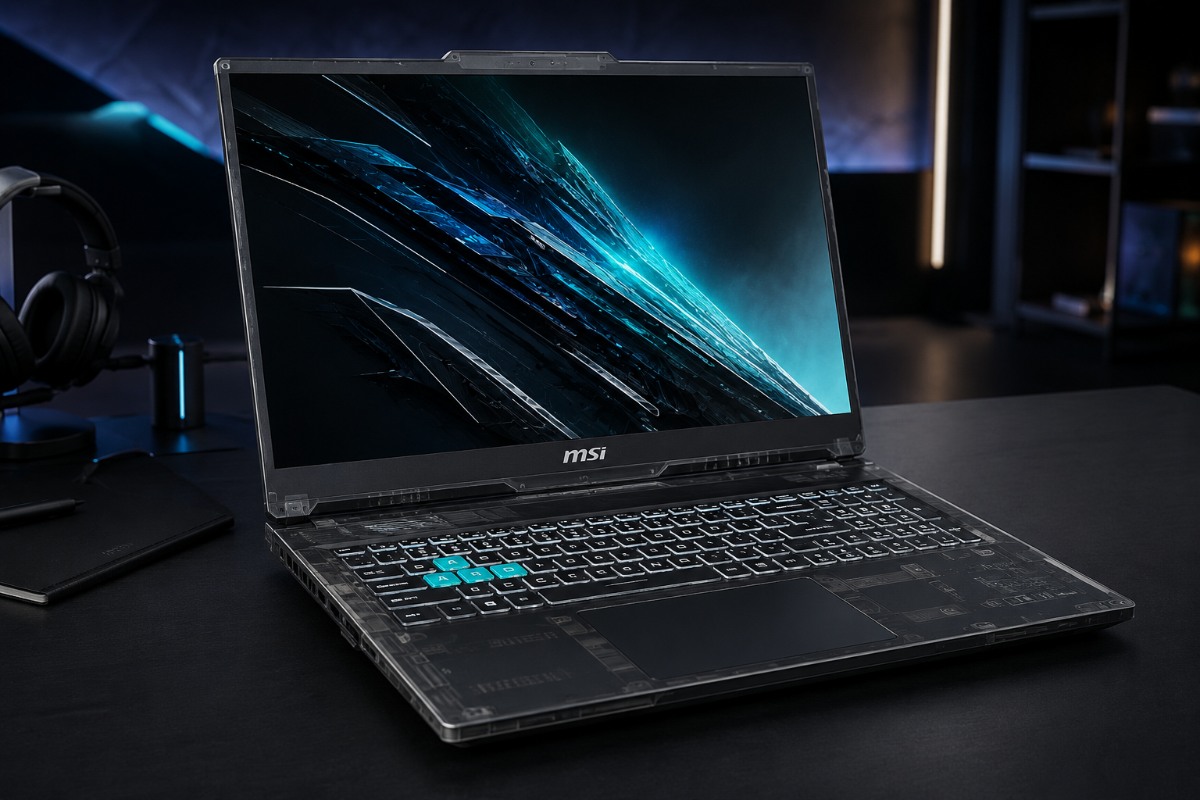
MSI Cyborg 17 gaming laptop brings RTX 50 Series hardware to a lower price, but its 55 W GPU limit deserves attention.
At about $1,100, the MSI Cyborg 17 makes a very specific pitch: a huge 17.3 inch screen, NVIDIA’s RTX 5060 Laptop GPU, and a translucent chassis without the premium laptop price. That sounds like a strong value play, but it also comes with tradeoffs that buyers should understand before checkout. This is not a thick, high wattage performance notebook built to squeeze every frame out of the RTX 5060. It is a mainstream gaming laptop designed around a lower power graphics setup, a Full HD 144 Hz panel, and a chassis that looks more interesting than most budget machines. MSI is betting users will trade some raw performance for a bigger display, modern RTX features, and a design that does not feel generic.
MSI offers the Cyborg 17 B2RW with Intel Core Series chips, including configurations built around the Core 5 210H and Core 7 240H. The retail model highlighted near $1,100 is listed with an Intel Core i5 class processor, RTX 5060 graphics, 16 GB of RAM, and a 512 GB SSD. Other models may offer more storage or faster processors, so buyers should check the exact configuration before assuming every Cyborg 17 delivers the same value.
A Budget Laptop That Actually Looks Different
Most affordable gaming laptops still look like thick black slabs with RGB lighting added as an afterthought. The Cyborg 17 tries something more visible. Its translucent black material gives the chassis a faint view of the structure beneath, while the highlighted WASD keys and angular detailing lean into a sci fi style without pushing the design into toy territory.
That matters because this segment is crowded. Acer, Asus, HP, Lenovo, and MSI all sell machines with similar screen sizes, similar GPUs, and similar prices. A more recognizable shell gives MSI a way to stand out before anyone even checks benchmark charts.
Still, design should not distract from practical details. The Cyborg 17 remains a large 17 inch machine. It is more desk friendly than travel friendly. Users get more screen space and better immersion, but they also give up some portability compared with a 15 inch or 16 inch laptop.
The RTX 5060 Is The Headline, But 55 W Changes The Story
The RTX 5060 Laptop GPU is the key selling point, but the power limit shapes the real performance story. MSI lists the Cyborg 17 B2RW RTX 5060 configuration with 8 GB of GDDR7 memory and a 55 W maximum graphics power rating with Dynamic Boost.
Dynamic Boost is NVIDIA’s system for shifting power between the CPU and GPU depending on workload. If a game needs more graphics power, the laptop can temporarily send more available power to the GPU. In the Cyborg 17, that ceiling is still listed at 55 W, so the chip cannot stretch as far as RTX 5060 laptops with much higher graphics power limits.
This is crucial. Laptop GPUs do not perform the same just because they share the same name. A thicker machine with a higher wattage RTX 5060 can deliver stronger sustained frame rates. The Cyborg 17’s 55 W version should run cooler and fit the chassis better, but it will not match heavier systems using the same GPU name at higher power.
That is where machines such as the ASUS TUF Gaming F16, A16, or A18 become useful comparison points. Those 2025 TUF RTX 5060 configurations are listed with much higher maximum GPU power figures than the Cyborg 17. They may cost more, use different screens, or sacrifice some of MSI’s visual flair, but they make the larger point clear: an RTX 5060 label does not guarantee identical speed.
A higher wattage RTX 4060 laptop from the previous generation could also beat this Cyborg 17 in raw frame rates in some games. Buyers should not shop by GPU name alone. Total Graphics Power, cooling, and display resolution matter just as much.
The good news is that MSI picked a sensible screen for this hardware. The 17.3 inch Full HD 144 Hz panel handles 1080p play well, delivering smooth motion without crushing the GPU like a QHD or 4K screen would.
The Real Buying Concerns Are Storage, Screen Quality, And Cooling
The $1,100 configuration looks attractive, but the 512 GB SSD is tight in 2026. A few major games can eat through that space quickly once Windows, launchers, updates, and media files are included. Buyers who keep a large game library should budget for an upgrade or choose a 1 TB model.
Screen quality also needs scrutiny. Budget 144 Hz laptop panels often focus on refresh rate rather than color accuracy. Some panels in this class sit around 45 percent NTSC color coverage, which is fine for casual play but weak for serious photo editing or color sensitive creative work. Anyone planning to use Premiere Pro, Photoshop, or DaVinci Resolve should check the exact panel rating before buying.
Cooling is the third question. A 17 inch chassis gives MSI more physical room than a compact notebook, but the Cyborg line is not built like a thick desktop replacement. Fan noise under load, surface heat, and sustained GPU clocks will decide whether the laptop still feels quick after 20 minutes of play.
MSI AI Engine Needs A Reality Check
MSI says AI Engine “adjusts various system settings automatically to best fit your needs.”
That line sounds useful, but buyers should separate real AI performance from laptop software branding. MSI AI Engine appears to focus on scenario tuning, such as switching system behavior based on what the user is doing. In plain English, that likely means adjusting power profiles, fan behavior, display settings, or audio modes.
Those controls can help, but they are not new in principle. Laptop brands have offered automatic and manual performance profiles for years. The more meaningful AI features come from the RTX hardware itself. NVIDIA is pushing the RTX 50 Series around DLSS 4, creator acceleration, and local AI workloads.
For users, that means the Cyborg 17 can do more than run games. It should handle 1080p video timelines in Premiere Pro, GPU assisted effects, streaming tools, and small local AI experiments better than a basic productivity laptop. Its 8 GB of GDDR7 video memory helps with these tasks, though it does not turn the machine into a professional workstation.
A Sensible Big Screen Choice, Not A Performance Monster
The Cyborg 17 works best when judged on the right terms. It is not trying to challenge MSI’s Titan or Raider laptops. It is trying to give mainstream buyers a large display, RTX 50 Series features, and a more interesting design at a price that stays close to the affordable end of the market.
For students, casual creators, and players who want 1080p performance on a bigger panel, that mix makes sense. The laptop should suit Fortnite, Call of Duty, Valorant, and many single player titles at sensible settings. It can also double as a dorm room or family PC for editing, schoolwork, streaming, and everyday productivity.
The warning is simple: do not buy it expecting every RTX 5060 laptop to behave alike. The 55 W graphics limit, possible 512 GB storage, and budget panel class all matter. MSI is betting you will trade some raw speed for a 17 inch screen and a chassis that looks sharper than most rivals at this price.
That tradeoff is reasonable for the right buyer. It just needs to be understood before checkout.
Also Read: RTX 5080 Power For Less: Is Thunderobot Radiant 16 Worth The Brand Risk?
FAQs
Q. Is the MSI Cyborg 17 good for gaming?
Yes, the MSI Cyborg 17 should suit 1080p gaming well. Its RTX 5060 and 144 Hz display fit esports and many modern titles.
Q. Why does the MSI Cyborg 17’s 55 W GPU limit matter?
The 55 W limit caps how far the RTX 5060 can boost. Higher wattage RTX 5060 laptops may deliver stronger frame rates.
Q. Is every RTX 5060 gaming laptop equally fast?
No. Laptop GPU speed depends on wattage, cooling, and display resolution. The same RTX 5060 name can mean different real world performance.
Q. Does MSI AI Engine improve gaming performance?
MSI AI Engine mainly adjusts system settings and profiles. The more important AI gaming features come from NVIDIA’s RTX hardware and DLSS 4.
Q. Should creators buy the MSI Cyborg 17?
Casual creators can use it for 1080p video editing and GPU assisted tasks. Color sensitive work needs a better display check first.

Anup Singh is an independent technology journalist and content writer covering Apple, Android, AI, laptops, gaming, and the consumer tech industry. He focuses on delivering factual, well researched, and easy to understand reporting while explaining how new technologies impact everyday users.
1 thought on “MSI Cyborg 17 Review: RTX 5060 Power With Practical Limits”